
Onboarding Guide
This section guides you through the process of setting up and starting to send emails in Aurora SendCloud
Welcome to Aurora SendCloud 🚀

Get started with Aurora SendCloud in minutes
Get up and running with Aurora SendCloud in just a few simple steps! We've streamlined the onboarding process so you can start sending emails immediately.
Send Your First Email in Minutes
Good news! We've pre-configured everything you need to get started:
- ✅ Test sending domain (ready to use)
- ✅ API_USER credentials (automatically generated)
- ✅ Email templates (pre-built and customizable)
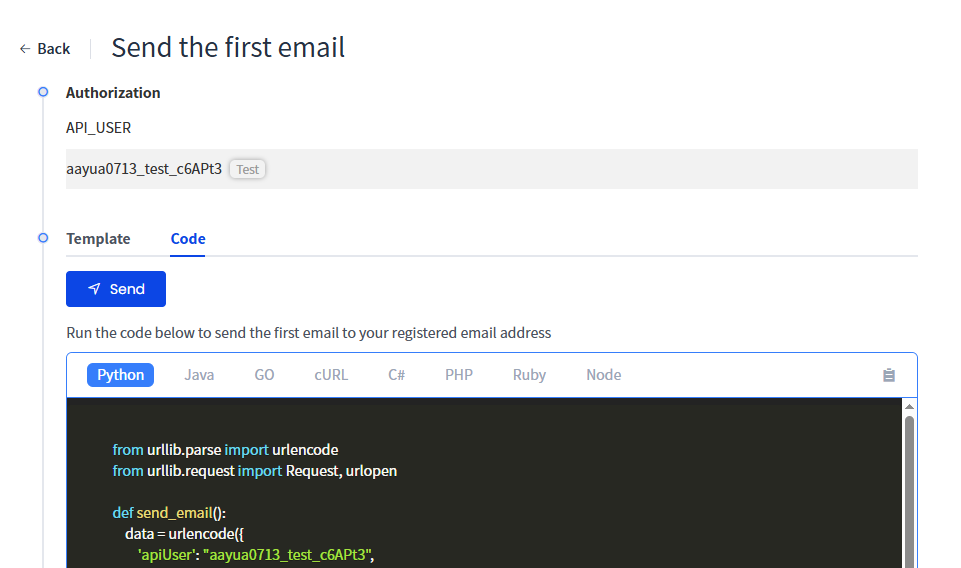
Choose Your Preferred Method
Perfect for beginners - use our pre-built email templates with a simple interface. No coding required!
For developers - integrate directly with our REST API for complete customization and control.
Set Up Your Sending Domain
Your sending domain is your email identity - it's what recipients see in the "From" field and what email providers use to verify your authenticity.
Why This Matters
Domain Benefits & Impact
Deliverability: Verified domains significantly improve your email delivery rates and reduce spam filtering.
Trust & Branding: A custom domain builds recipient confidence and reinforces your brand identity.
Reputation Management: Establish and maintain a positive sender reputation with email providers.
Quick Setup Steps
- Add your domain in the Domain
- Add DNS records provided by Aurora SendCloud to your domain registrar
- Verify ownership - we'll automatically check your DNS settings
- Start sending once verification is complete (usually takes 5-15 minutes)
Pro Tip: Use a subdomain likemail.yourcompany.comto keep your main domain reputation separate from email sending.
Understand Your API_USER
Your API_USER is your secure authentication key for accessing Aurora SendCloud's services.
What It Does
Securely connects your applications to Aurora SendCloud's email infrastructure
Links email statistics and analytics to your specific account and usage
Security Best Practices
- 🔒 Never share your API_USER in public repositories or forums
- 🔄 Rotate regularly - update your credentials every 90 days
- 📱 Use environment variables to store credentials in your applications
- 👥 Create separate API_USERs for different applications or team members
🚀 Start Sending Emails
You're all set! Choose the approach that best fits your needs:
🛠️ Developer Path: Use Our API
Perfect for:
- Custom applications
- Automated email workflows
- Advanced integration needs
What you get:
- Full REST API access
- Comprehensive documentation
- Code examples in multiple languages
- Real-time webhooks for delivery tracking
Track Your Success
Both sending methods provide powerful insights:
- Delivery Rates: Monitor successful deliveries vs. bounces
- Open & Click Tracking: See engagement metrics in real-time
- Error Logs: Quickly identify and resolve delivery issues
- Performance Analytics: Optimize your email strategy with detailed reports
Updated 3 months ago