
What is SMTP
SMTP (Simple Mail Transfer Protocol) is the standard protocol for applications to submit emails to mail servers.
An application establishes a TCP connection to the SMTP server, enables TLS based on the access method, completes authentication, then specifies the sender, recipients and email content sequentially. The server returns an SMTP response code after accepting the email.
SMTP Session Sequence
The figure below illustrates the typical sequence of commands and responses between the client and server when an email is submitted to the SendCloud email platform over a secure connection, including the full AUTH LOGIN authentication process.
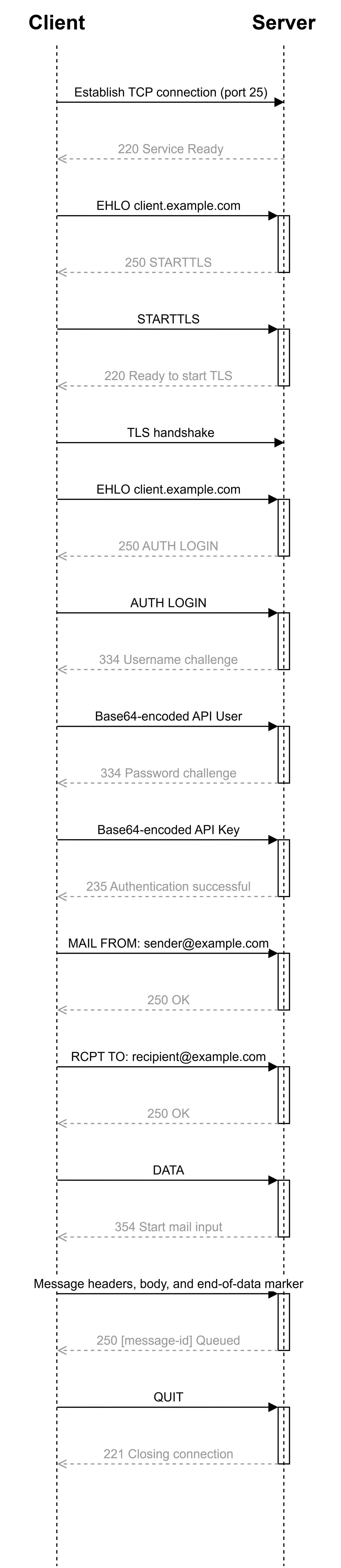
Integration Procedure
- Obtain the API User and API Key in the SendCloud email platform console.
- Connect to port 25 of
smtp.sendcloud.net. - Send EHLO, execute STARTTLS and complete the TLS handshake, then send EHLO again.
- Use the API User and API Key to complete authentication via AUTH LOGIN.
- Set the sender, recipients, subject and email body, then submit the email.
- Receiving the final 250 response means the email has been accepted by the SendCloud email platform.
Connection Methods & Authentication Parameters
| Parameter | Value | Description |
|---|---|---|
| SMTP Server | smtp.aurorasendcloud.com | SMTP entry point of the SendCloud email platform. |
| Port | 25,2525,587 | SMTP connection port. |
| Encryption Method | STARTTLS | Upgrade to TLS after connection before authentication. |
| API User | API User | Obtained from the console of the SendCloud email platform. |
| API Key | API Key | Obtained from the console of the SendCloud email platform. |
| Authentication Method | AUTH LOGIN | Common SMTP clients will automatically complete authentication interaction. |
SMTP Servers
| Region | SMTP Server | Supported Ports |
|---|---|---|
| Singapore | smtp.aurorasendcloud.com | 25, 2525, 587 |
| US (Silicon Valley) | smtp-us.aurorasendcloud.com | 25, 2525, 587 |
| CN (Hong Kong) | smtp-hk.aurorasendcloud.com | 25, 2525, 587 |
Python Sending Example
The following example uses Python standard libraries to establish a connection via port 25, perform STARTTLS, and send a plain-text email encoded in UTF-8.
import os
import smtplib
import ssl
from email.message import EmailMessage

SMTP_HOST = "smtp.aurorasendcloud.com"  # Singapore
SMTP_PORT = 25
API_USER = os.environ["YOUR_API_USER"]
API_KEY = os.environ["YOUR_API_KEY"]

message = EmailMessage()
message["From"] = "[email protected]"
message["To"] = "[email protected]"
message["Subject"] = "Test Email from SendCloud Email Platform"
message.set_content("This is a test email sent via SMTP.")

ssl_context = ssl.create_default_context()

with smtplib.SMTP(SMTP_HOST, SMTP_PORT, timeout=30) as client:
    client.ehlo()
    client.starttls(context=ssl_context)
    client.ehlo()
    client.login(API_USER, API_KEY)
    client.send_message(message)

print("Email submitted to SendCloud email platform")
Normal Response Codes
| SMTP Code | Phase | Description |
|---|---|---|
| 220 | Connection Establishment or STARTTLS | SMTP service ready, or ready to initiate TLS handshake. |
| 334 | AUTH LOGIN | Server requests API User or API Key. |
| 235 | AUTH LOGIN | Authentication succeeded. |
| 250 | SMTP Command or Message Submission | Command executed successfully; the final 250 after DATA indicates the message has been accepted. |
| 354 | DATA | Server is ready to receive message headers and body. |
| 221 | QUIT | SMTP session closed normally. |